Application Support:
If you have any questions about TrackRanger, or any of our other products then firstly have a look through the following sections and documents:
- TrackRanger FAQ
- TrackRanger Quick Start Guide
For more help please don’t hesitate to send us an email through: [email protected]
Download TrackRanger Help File from this link
Running TrackRanger on Apple Mac
One of our users sent this great information on using TrackRanger and specifically the GPS connectivity with Parallels software on a Mac.
“I am running the Advantech system on my ʻMacbook proʼ via ʻParallelsʼ using the Windows XP Pro Operating System. I loaded the mapping disc and maps and the disc for the Advantech GPS.
The maps worked well but I could not find the GPS. The problem being that it would not link to a com port. I then discovered that I was missing a file ʻser2pl.sysʼ.
The file may be downloaded from this link (32-bit operating systems) or this link (64bit operating systems) and then saved to your
C: Windows System32 Drivers folder.
Then insert the GPS into a USB port, click on the ʻparallelsʼ symbol at top of screen. From the drop-down select devices, USB, USB serial controllers. The ballon will say ʻfound new hardwareʼ, and the GPS will then be able to connect.
Open up TrackRanger, select the Satellite Data page, in ʻGPS Commsʼ set the COM Port, Save, and then link to the GPS.”
TrackRanger GPS comes with a printed quick guide on determining the COM port to use.
Further information from another user may be found here
Error Messages & Problems:
‘Unable to show Toolbar’ message or ‘Unspecified Error’ message
TrackRanger may give an ‘Unable to show Toolbar’ message or ‘Unspecified Error’ when opening an ECW (e.g. Natmap) map, or advises that a Waypoint file is invalid, or does not store the registration correctly etc. This can occur if TrackRanger is not running with correct privileges. Windows 8, 7 and Vista can cause this if User Authorisation Control (UAC) is set too high. There are two known ways to overcome:
1: Right-click on TrackRanger and select Run As Administrator:
(do this every time)
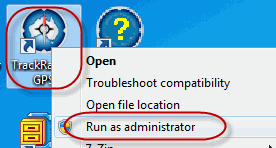
or
(do this only once)
Change UAC control settings from:
Windows > Control Panel > System and Security > Action Center
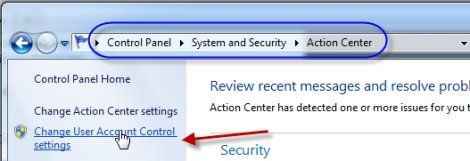
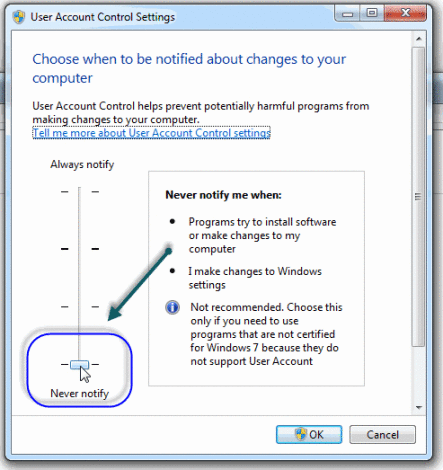
Also, set TrackRanger to Always run as Administrator: Use Windows Computer to find drive:TrackRanger folder that TrackRanger is installed in (usually C: drive), right-click on TrackRanger.exe, select Properties:
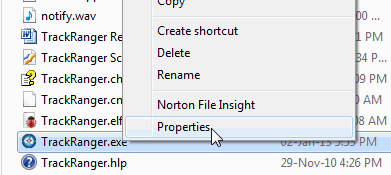
Then select the Compatibility tab, and check Run this program as Administrator, and press Apply.
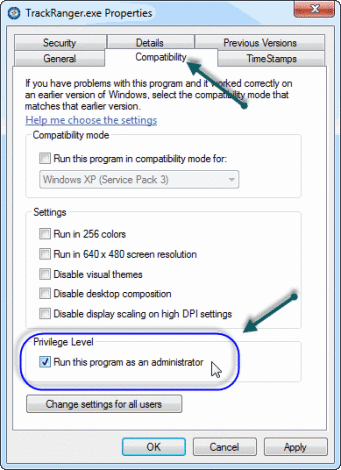
If you still get a message Unable To Show Toolbar, please Start TrackRanger, Close All Maps, and then Press Control-K to register the DLL. TrackRanger must be started in Administrator Mode
Then shutdown and restart TrackRanger
An alternative is to Uninstall and Reinstall TrackRanger from the distribution disk.
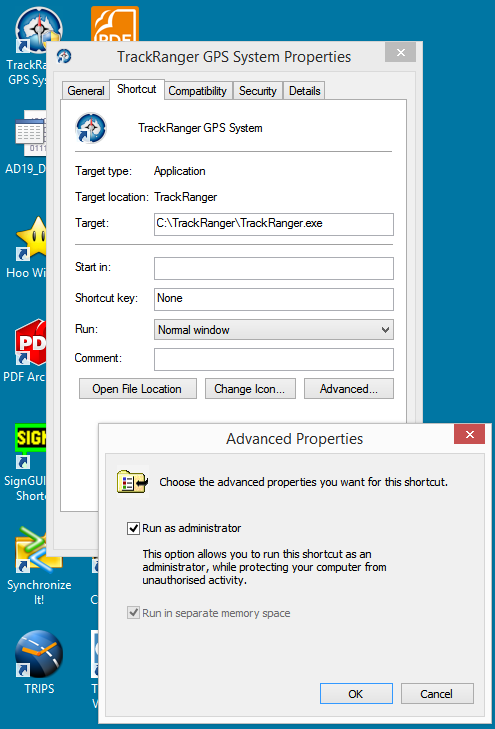
How to set Run as Administrator on Windows 8:
Right-click on TrackRanger on the desktop,
Select Properties, then Shortcut then Advanced, then tick Run as Administrator
Graph Hopper Map and Browser Issues
TrackRanger Web Browser gives problems when trying to connect to Graph Hopper Maps
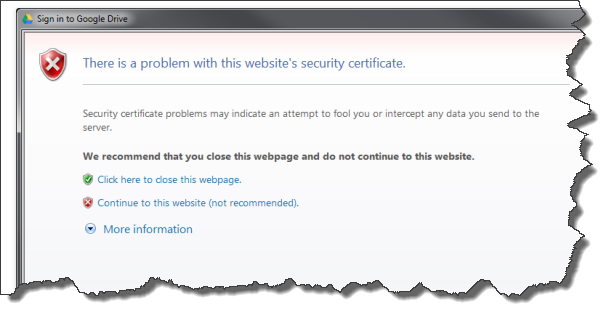
The user may be presented with a message:
There is a problem with this website’s security certificate.
Security certificate problems may indicate an attempt to fool you or intercept any data you send to server.
We recommend that you close this webpage and do not continue to this website.
• Click here to close this webpage.
• Contiue to this website (not recommended).
• More information
Solution:
Open Windows Internet Explorer, go to Tools (Alt+X) -> Internet options
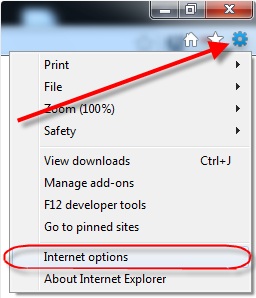
click the Advanced tab, in the Security section, uncheck or clear the box for the following three options:
- Check for publisher’s certificate revocation
- Check for server certificate revocation*
- Check for signatures on downloaded programs
as shown in the screenshot:
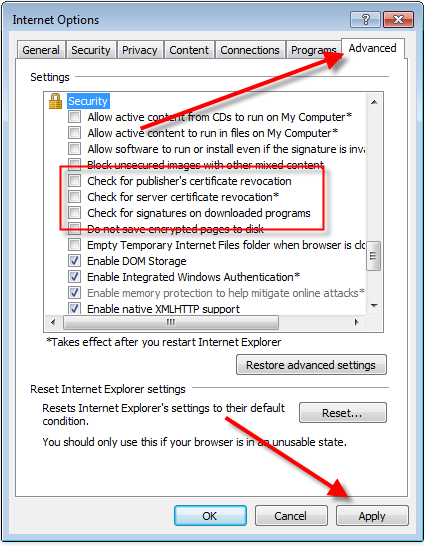
then Apply and Close Internet Explorer (all IE windows opened).
Tip: You may have to restart the computer for all changes to take effect.
Poor Quality Graphics
Blockiness of map display may be related to screen resolution, especially on some tablet devices. On some small-screen high-defintion displays, Windows takes a normal image (100%) and expands it (stretching the dimensions) so that text is more readable. This affects the mapping scales
To check if the screen expansion is the case, check Control Panel > Display > Change Size of all items
If it is set to 150%, change it to Medium – 125% or Smaller – 100%, and then if you still want larger font to see menus etc, this can be done from Display > Change Text Size, and select the required items to change:
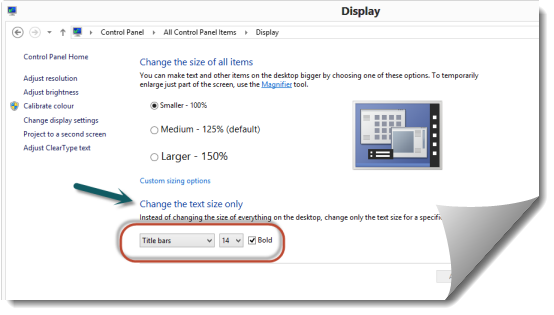
If the Text has been set back to 100%, you can then increase graphics size by simply lowering the Screen Resolution.
Blurry Text, incorrect map displays, especially with Windows 8.1 / Windows 10
Please follow the instructions on this link
OLDER VERSIONS:
Please note that we can no longer continue to provide support to superseded versions of our products. Due to the many changes and advancements over the years, TrackRanger Versions prior to Pro-8 are no longer eligible for support, therefore if you own an older version, you will need to upgrade to continue to receive support. This includes new/replacement registrations etc. Upgrading gets you all the new features also.